 Many computer users make use of security tools that limit their exposure to hackers, and they generally understand that hacks are something that can realistically happen to them. On the other hand, there are plenty of other folks out there who don’t worry enough. They might think their PC holds no value to the average hacker, but they’re wrong.
This should come as no surprise to any security-minded business owner, but some people think that they’re not important enough to be hacked. They believe that they’ve got an invisible shield between themselves and hackers, who want nothing more than to steal anything and everything they can get their grubby little hands on. Chances are that cybercriminals have found a way to monetize just about any form of data that can be harvested from a computer, be it simple and benign, or up close and personal.
Even the most civilianized PC holds valuable data to hackers, and all it takes is the infiltration of a virus or a piece of malware to end everything. Once a PC is infected, the possibilities are, quite literally, endless. Hackers can enslave your machine and use it against others by turning it into a botnet, or they can rig it with spyware and trojans to collect information over time. They can gain access to social media and email accounts, online shopping accounts, and bank accounts. They can even turn your PC into a spambot to spread threats to other systems.
To emphasize just how dangerous an infected PC can be, check out this infographic used by Brian Krebs on his security website:
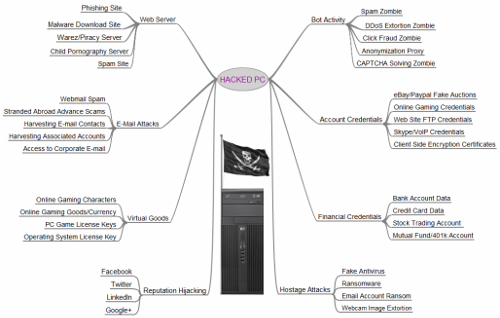
As you can see, there are a plethora of options that a hacker has when infecting your computer. The unfortunate fact of the matter is that any PC or workstation is going to hold some sort of sensitive credentials, regardless of who’s using it, and for what purpose. Especially in the business environment, you need to be taking advantage of comprehensive security measures that limit your exposure to threats, and proactively eliminate those that you are exposed to. The goal of taking proactive measures to protect your organization is to catch small issues and correct them before they turn into crippling problems that are more difficult to resolve.
To this end, a Unified Threat Management (UTM) tool is a much-desired solution. The UTM takes powerful security tools, like an enterprise-level firewall and an antivirus solution, and combines them with preventative tools like web content filtering and spam blocking to make sure that your workstations, and the network they’re connected to, are minimally exposed to threats. While it’s still not a full guarantee that you’ll completely avoid hacks, the chance of you running into them is still negligible compared to those who simply “hope” to avoid hackers.
If your business is ready to start taking security seriously, give Evolve IT a call at (518) 203-2110. We can work with you to shore up any weak points in your company’s infrastructure, and advise your staff on security best practices.

